
What Is Adobe Quick Cut, Exactly?
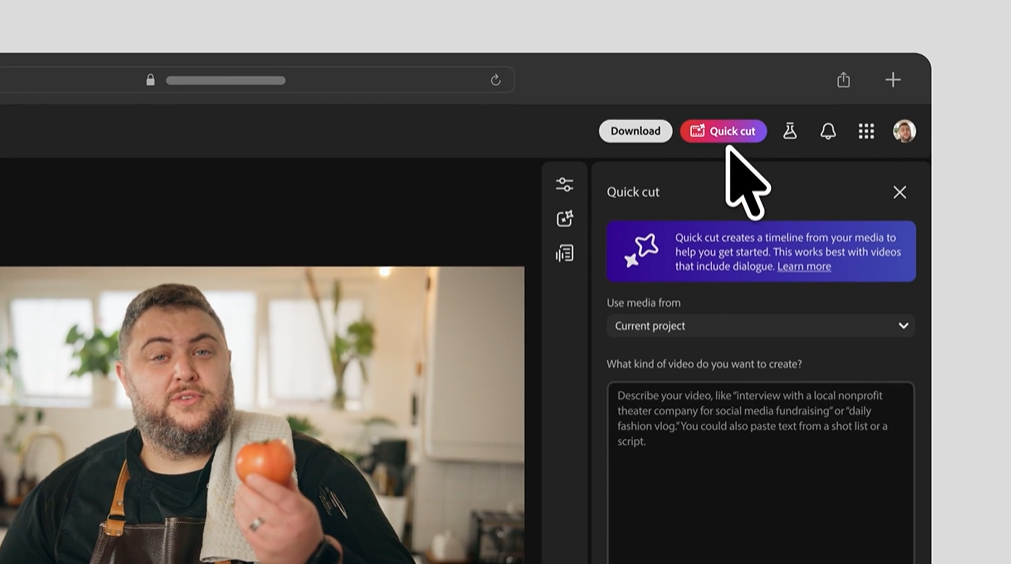
Launched in beta on February 25, 2026, Quick Cut is a new AI-powered feature inside Adobe Firefly's video editor. The premise is simple: you dump your raw footage in, describe what you're going for "product unboxing," "travel vlog," "interview highlights" and the tool assembles a structured first cut for you in seconds.
Think of it less like "AI makes your video" and more like "AI watches all your footage so you don't have to." It identifies key moments, trims the filler, and gives you a rough narrative-first assembly you can actually react to. No more staring at 47 takes of someone saying "um" before finally nailing the opening line.
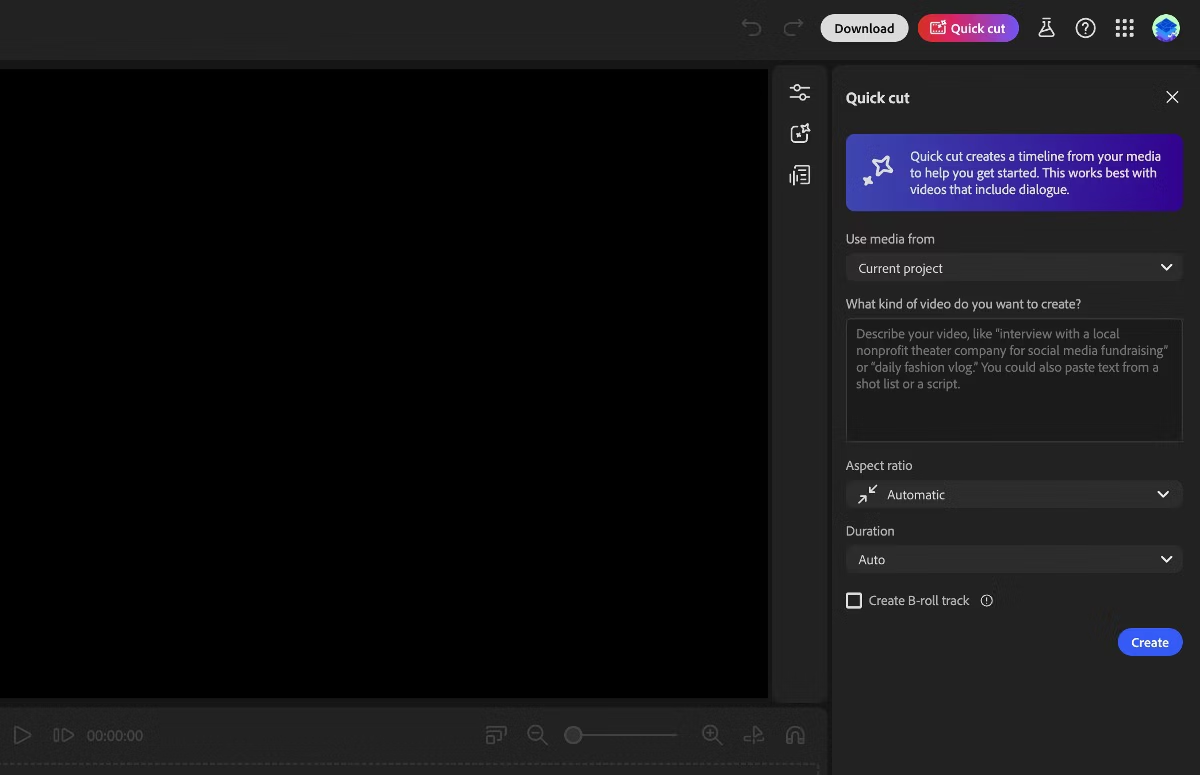
You can even give it a shot list or a script for extra precision, select your aspect ratio, set your pacing preferences, and optionally add a B-roll track. Then Quick Cut delivers a multi-track result inside Firefly's editing interface, ready for your very human touch.
The Part Where AI Is Actually Impressive
Adobe demonstrated Quick Cut using footage from a gaming console controller review and the assembled cut was, by their own admission, rough. But here's the thing: it was fast. Seconds-fast. What would have taken a human editor 20-30 minutes of scrubbing to rough-cut, the tool pieced together before your espresso shot finished pulling.
For anyone doing content at volume — social media creators, marketing teams, journalists cutting interview clips — this is genuinely meaningful. The wall between "I have clips" and "I have something to show the client" just got a lot shorter.
Adobe's senior director of product management, Mike Folgner, described the vision well: some parts of video editing really are tedious. Assembly isn't the creative part. It's the homework before the creativity starts.
The Part Where AI Is Still, Adorably, Not a Real Editor
Here's where we have to be honest about the hype.
Quick Cut produces a starting point, not a finished product. Adobe was very clear about this and honestly, good on them for managing expectations. The demo footage needed "obvious refinement." The AI doesn't understand your brand voice, your audience's attention span, your client's inexplicable obsession with slow zooms, or why that one take where the presenter laughed at the wrong moment is actually the one you should use because it makes them look human.
AI can identify what is in a shot. It cannot yet understand why a moment matters.
A first cut from Quick Cut is like getting a flat-pack furniture box where someone has already sorted the pieces into piles. Useful? Absolutely. Does it mean the chair will assemble itself? Not even a little.
The real editing the pacing decisions, the emotional arc, the choice to hold on a face two seconds longer than feels comfortable because that's where the story lives that's still 100% yours.
Who This Is Actually For
Quick Cut isn't trying to replace professional editors on a feature film. It's solving a very specific, very real problem for a very specific audience:
Content creators who shoot a 45-minute product demo and need a 90-second cut for Instagram by tomorrow morning. Marketers who have b-roll from a brand shoot and need three different cuts for three different platforms. Journalists who recorded a 2-hour interview and need to surface the five most quotable moments before the story goes live.
For these use cases, Quick Cut isn't a gimmick it's a genuine workflow accelerant.
The Bigger Picture: Adobe vs. the AI Video Race
Adobe isn't alone in this space. OpenAI has been teasing Sora. Google DeepMind is developing Veo. The race to own AI video is very much on.
What Adobe has going for it is a legal moat: Firefly models were trained exclusively on licensed Adobe Stock content and public domain material, which means they're not currently in the crosshairs of the copyright lawsuits hitting other AI companies. In an industry that's still negotiating AI terms after the 2023 WGA and SAG-AFTRA strikes, that's not nothing.
The integration with Premiere Pro which Adobe has promised for later this year is where this gets really interesting for professionals. Quick Cut as a standalone Firefly feature is helpful. Quick Cut living inside your existing Premiere workflow could be genuinely transformative.
The Bottom Line
Adobe Quick Cut is a smart, sensibly scoped tool that does exactly what it claims to do: gets you from a pile of clips to a workable first draft, fast. It doesn't replace creative judgment. It doesn't fix bad footage. It certainly doesn't know that your interview subject's best take was the one where they almost knocked over their water glass.
What it does is remove the blank timeline problem. And if you've ever spent 45 minutes doing nothing but logging clips before you've edited a single frame, you know that's a real problem worth solving.
The AI isn't taking editing jobs. It's just taking the parts of editing nobody actually likes doing.
Which, honestly? Fair enough.
Quick Cut is currently available in beta for Adobe Firefly users. Adobe is running an unlimited generations promotion through March 16 for new Firefly Pro and Premium subscribers.